
What is a Data lake?
A data lake serves as a centralized repository for storing vast amounts of data in its original format, eliminating the need for upfront structuring or modelling. This architecture enables organizations to store both structured data, such as databases, and unstructured data, such as images and videos, in a unified storage system. In a data lake architecture, data is typically stored in a distributed file system, such as Hadoop Distributed File System (HDFS) or Amazon S3. Data in a data lake is organized using folders and files, with metadata tags providing additional context for efficient data discovery and retrieval.
Traditional approach
In the past, organizations have often used SQL-based approaches to identify changed records in their source systems. This involves filtering records based on “last updated” timestamps or periodically refreshing all data. However, both methods have limitations. Timestamp-based filters are effective only if timestamps are consistently accurate, while full refreshes can be resource-intensive and may not provide up-to-date information on time.
Continuously tracking changes is either not feasible or is achieved by marking the initial state as a reference point.
In this blog post, we’ll dive into the details of data migration to Amazon Web Services (AWS) using the AWS Database Migration Service (DMS). We’ll explore how data from multiple PostgreSQL databases hosted on EC2 instances to Apache Parquet format is migrated in the S3 data lake.
Challenges
Migrating data presents numerous challenges. Here are some of the key hurdles in the migration process:
Solution Overview
The following diagram displays a high-level architecture of the solution, where we use AWS DMS to move data from multiple PostgreSQL databases hosted on Amazon EC2 to Amazon S3.
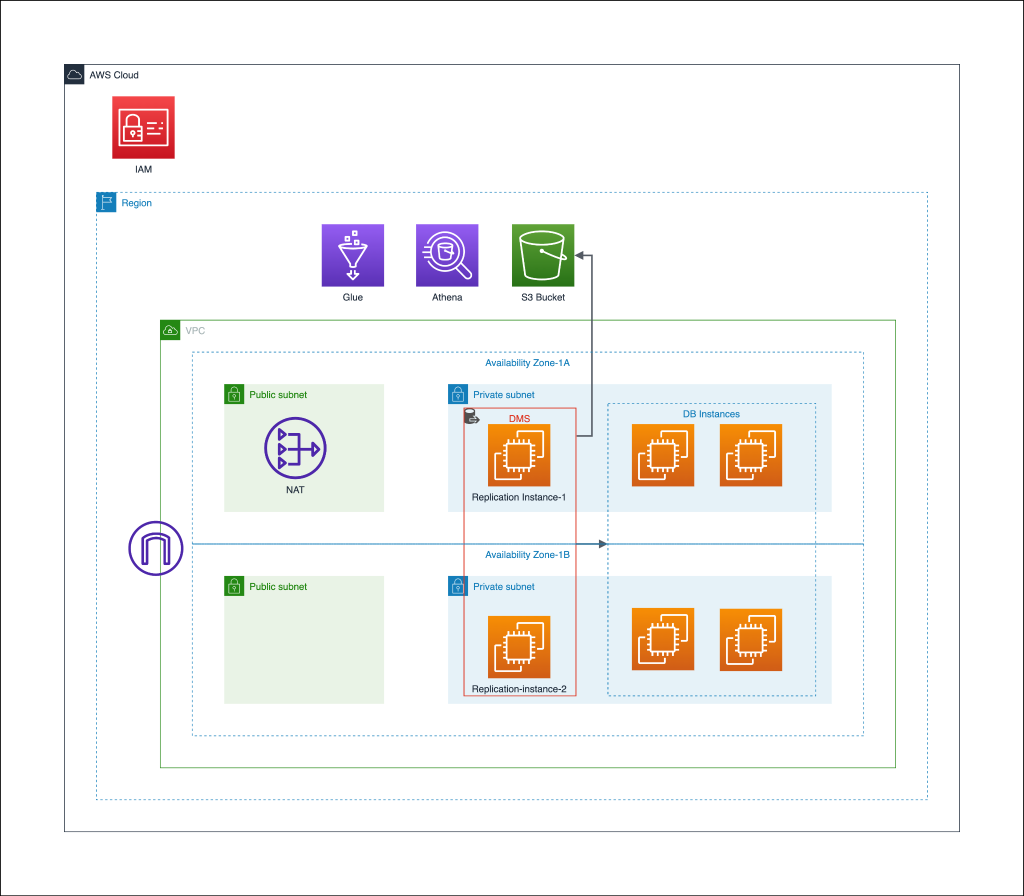
Overview of the Setup
This setup is aimed at securely and efficiently transferring data from multiple PostgreSQL databases running on EC2 instances to Apache Parquet format in the Amazon S3 data lake. The migration process is carried out using AWS DMS, allowing for both full load and ongoing replication tasks. For each source database, the data migration is managed by a dedicated DMS instance, ensuring parallel and scalable operations.
To make sure that the whole migration process is carried out privately S3 endpoint is conferred in the VPC. For cost optimization during the migration process, we can initially utilize a larger instance type (e.g., dms.r5.xlarge) for the full load process in DMS replication tasks. However, once the full load is complete and the status transitions to ongoing replication, we can monitor the CPU and memory metrics for the instance. Based on observations, we can make a strategic switch to a smaller instance type to reduce costs while maintaining optimal performance. This dynamic instance resizing requires careful monitoring and analysis to ensure a smooth transition and cost-effectiveness.
AWS Database Migration Service (DMS) Setup
1. Create IAM Role and Policy for DMS
The process begins with creating an IAM role tailored for DMS replication following the principle of least privilege. This role has the following policy attached to it that grants selective access to the Amazon S3 destination bucket.
{ “Version”: “2012-10-17”, “Statement”: , “Resource”: , “Effect”: “Allow” }, { “Action”: “s3:ListBucket”, “Resource”: “arn:aws:s3:::destination-bucket”, “Effect”: “Allow” } ]}
2. Subnet Group and S3 Endpoint
To ensure secure communication within the AWS ecosystem, subnet groups comprising private subnets are created for each VPC. Additionally, an S3 VPC endpoint is established in the VPC, optimizing data transfer and enhancing network security.
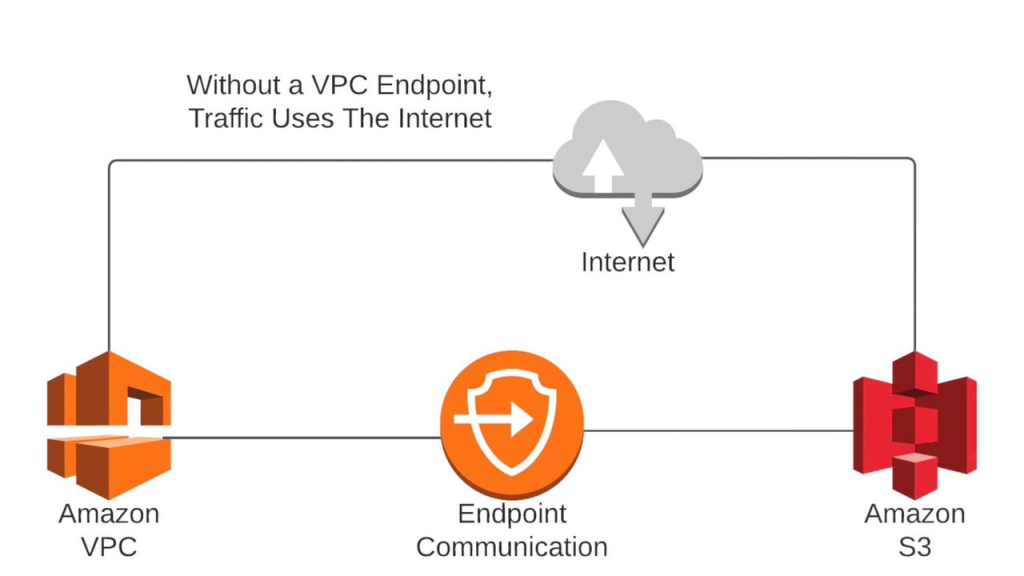
Image ref: link
3. Security Groups for DMS
DMS instances should be attached with dedicated security groups, allowing them to connect to source endpoints securely. Necessary rules for communicating with all database servers need to be configured within these security groups.
2. Replication Instances
The backbone of our data migration lies in the DMS replication instances. Each database migration task is assigned a separate instance, ensuring isolation and scalability. The instance type should be selected to efficiently manage the high load and number of tables for each table.
4. Source and Destination DMS Endpoints
Configuration of source and destination endpoints with the right parameters is very crucial. Source endpoints represent the PostgreSQL databases running on EC2 instances, while target endpoints signify the destination location. In this case, an S3 bucket serves as the target endpoint and the following endpoint configurations were done to ensure that the data is transformed and stored in the desired Apache Parquet format in the destination bucket:
{
“ServiceAccessRoleArn”: “dms-s3-access-role-arn”,
“BucketName”: “”,
“BucketFolder”: “”,
“CompressionType”: “NONE”,
“DataFormat”: “parquet”,
“EnableStatistics”: true,
“DatePartitionEnabled”: true,
“MaxFileSize”: 64000,
“CdcMaxBatchInterval”: 3600,
“CdcMinFileSize”: 64000,
“IncludeOpForFullLoad”: true
}
6. Replication Tasks
Comprehensive migration strategies involve both full-load migration and Change Data Capture (CDC). For each database migration, a dedicated DMS replication task is set up, facilitating ongoing data synchronization once the full load is migrated.
Parallel threads in AWS DMS are recommended for replication tasks for scenarios involving large datasets or partitioned data, we can achieve faster migration times and improved efficiency during the data transfer process.
When configuring parallel load, specify the maximum number of tables to load in parallel using the MaxFullLoadSubTasks task setting. Additionally, we can control the number of threads per table using the ParallelLoadThreads target metadata task setting for certain target endpoints
Use the following JSON to configure the replication task:
{
“TargetMetadata”: {
“SupportLobs”: true,

“LimitedSizeLobMode”: true,

“LobMaxSize”: 6400,
},
“FullLoadSettings”: {
“TargetTablePrepMode”: “TRUNCATE_BEFORE_LOAD”,

“MaxFullLoadSubTasks”: 20,

“CommitRate”: 50000
},
“Logging”: {
“EnableLogging”: true
}
}
7. S3 Bucket for Destination
An S3 bucket is designated as the destination for migrated data and within this bucket, individual folders are created to correspond to each database being migrated. This organization ensures that the data remains structured and easily accessible, simplifying management and future retrieval processes. This structured format also facilitates seamless integration with Athena and Glue for efficient data analysis and processing.
The S3 bucket is configured to block all public access by default and the below-mentioned bucket policy is used for the bucket to allow only the DMS role to access it.
Conclusion
In summary, this blog post has explored the solution for simplifying data migration and transformation to an AWS S3 data lake using DMS. It presents a cost-effective and efficient approach for organizations dealing with extensive data migration tasks. By prioritizing data security and compliance, ensuring data transfer occurs over private networks, and carefully planning and executing the migration process, organizations can uphold data integrity, control costs, and enhance overall efficiency in managing their data lakes, even when handling substantial data volumes.
Written by Deepak Puri