
Introduction
In today’s interconnected and dynamic cloud environment, securing access to resources across multiple AWS accounts is paramount for maintaining robust security posture. This blog delves into the realm of AWS IAM security, focusing on the strategic utilization of External IDs for enhancing cross-account access control. As organizations increasingly adopt multi-account architectures to segregate workloads and enhance security, understanding and implementing effective access controls becomes pivotal. We’ll explore how External IDs serve as a key mechanism in securely delegating access between AWS accounts, mitigating risks associated with unauthorized access, and ensuring compliance with security best practices. Through practical examples and insightful analysis, we’ll clarify the significance of leveraging External IDs for bolstering your AWS IAM security posture, empowering you to confidently navigate the complexities of cross-account access management.
Problem Statement
Before the adoption of external IDs in IAM role assumptions within AWS, there existed a significant security vulnerability regarding cross-account access and role delegation. Without additional verification measures, such as external IDs, unauthorized entities could potentially assume IAM roles, leading to unauthorized access to sensitive resources. This lack of robust authentication mechanisms left IAM setups vulnerable to various threats, including credential theft, replay attacks, and unauthorized access by insiders or external adversaries. Consequently, organizations faced challenges in securely managing access to their AWS resources, particularly in complex multi-account environments or when working with third-party services.
Solution
AWS IAM External ID provides a security solution by requiring third-party services to include a unique identifier (external ID) in their API requests when accessing AWS resources via IAM roles. This mitigates risks like CSRF(Cross-site Request Forgery) attacks by ensuring that only authorized requests, verified by matching external IDs, are granted access. Users set up IAM roles with optional external IDs, share the ID securely with third parties, and AWS validates requests against this ID, enhancing resource security and preventing unauthorized access.
Diagram
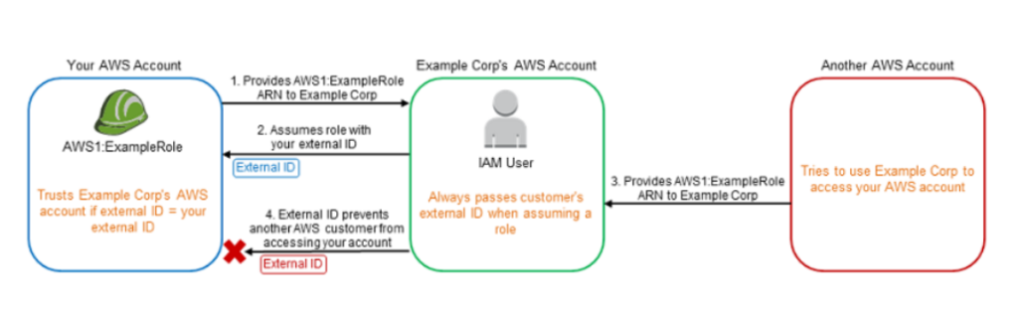
Steps for creating a External IDs for Cross-Account Access Control
“Statement”: [

{

  "Sid": "Stmt1714400029569",

  "Action":
  [

    "s3:GetObject",

    "s3:PutObject"

  ],

  "Effect": "Allow",

 "Resource": "arn:aws:s3:::BUCKET_NAME/*",

 "Principal": "*",

  "Condition": {

     "Bool": {

        "aws:SecureTransport": "false"

     }

  }

 }

]
- Create a new IAM policy :
{

    “Version”: “2012-10-17”,

    “Statement”: [

        {

            “Effect”: “Allow”,

            “Action”: “s3:ListAllMyBuckets”,

            “Resource”: “*”

        },

        {

            “Effect”: “Allow”,

            “Action”: [“s3:PutObject”,

                       “s3:GetObject”,

                       “s3:DeleteObject”],

            “Resource”: “arn:aws:s3:::BUCKET_NAME/*”

        }

    ]

}
- Create a new role using Another AWS Account :
-
enter the external party’s AWS account ID
-
Choose Require External ID and enter a unique ID “COM-TEST-LINE”
-
Attach the previously-created IAM policy to the newly created IAM Role
-
Make changes in Trusted entities for External_Id parameter :
-
“Statement”: [

    {

        “Effect”: “Allow”,

        “Principal”: {

            “AWS”: “arn:aws:iam::Client’s_AccountID:user/User_Name”

        },

        “Action”: “sts:AssumeRole”,

        “Condition”: {

            “StringEquals”: {

                “sts:ExternalId”: “COM-TEST-LINE”

            }

        }

    }

]
- Attach IAM Policy to Clients_Account’s User:
{

 “Version”: “2012-10-17”,

 “Statement”: [{

                “Effect”: “Allow”,

                “Action”: “sts:AssumeRole”,

                “Resource”:        “arn:aws:iam::OUR_AWS_ACCOUNT_ID:role/Role_Name”

               }]

}
- Provide Info to the Client :
-
Role ARN = arn:aws:iam::OUR_AWS_ACCOUNT_ID:role/Role_Name
-
STS External ID = COM-TEST-LINE
- Testing :
- Without External_id :
$ aws sts assume-role –role-arn arn:aws:iam::OUR_AWS_ACCOUNT_ID:role/Role_Name –role-session-name demo

An error occurred (AccessDenied) when calling the AssumeRole operation: User: arn:aws:iam::Client’s_AccountID:user/User_Name is not authorized to perform: sts:AssumeRole on resource: arn:aws:iam::OUR_AWS_ACCOUNT_ID:role/Role_Name
With External_id :
$ aws sts assume-role –role-arn arn:aws:iam::OUR_AWS_ACCOUNT_ID:role/Role_Name –role-session-name demo –external-id COM-TEST-LINE

{

    “Credentials”: {

        “AccessKeyId”: “XXXXXXXXXXXXXXXXXXX”,

        “SecretAccessKey”: “XXXXXXXXXXXXXXXXXXXXXXXXXXXXXX”,

        “SessionToken”: “XXXXXXXXXXXXXXXXXXXXXXXXXXXXXXXXXX”,

        “Expiration”: “2024-05-03T08:24:30+00:00”

    },

    “AssumedRoleUser”: {

        “AssumedRoleId”: “XXXXXXXXXXXXXXXXXXX:demo”,

        “Arn”: “arn:aws:iam::OUR_AWS_ACCOUNT_ID:role/Role_Name/demo”

    }

}
Benefits
Conclusion
In conclusion, implementing External IDs in AWS IAM is a critical strategy for securing cross-account access and enhancing overall security posture. By requiring the inclusion of a unique identifier in API requests, External IDs mitigate risks associated with unauthorized access, such as credential theft and confused deputy attacks. This added layer of verification ensures that only authenticated and authorized entities can assume roles and access resources across AWS accounts. Furthermore, the use of External IDs facilitates granular access control and provides valuable audit trails, making it easier to monitor and track access activities. Adopting this best practice not only strengthens security but also simplifies managing multi-account environments and working with third-party services. As organizations continue to expand their cloud infrastructure, leveraging External IDs becomes essential for maintaining robust and secure cross-account access controls.
Written by Mohd. Asif